

How to Stop Subscription Bombing in Gmail and Outlook
Subscription bombing is no longer just an email inconvenience. It is a deliberate cyber attack designed to overwhelm your inbox and hide real threats. If you are searching for how to stop subscription bombing, chances are you are already dealing with a sudden flood of emails you never signed up for.
In my experience, most users focus on deleting emails. But the real risk is not the volume. It is what attackers are trying to hide behind it.
What is Subscription Bombing
Subscription bombing is a high volume email attack where your inbox is flooded with hundreds or even thousands of subscription confirmation emails within minutes.
These emails are not malicious in nature. They come from legitimate websites and services. That is why traditional filtering systems often fail to stop them.
The real objective is distraction. While your inbox is overloaded, attackers try to carry out more serious actions in the background.
Why Subscription Bombing is Dangerous
This attack is often misunderstood as spam, but it is far more strategic.
Attackers use this method to:
- Hide password reset alerts.
- Mask financial transaction notifications.
- Distract users during account takeover attempts.
- Shift communication to other channels like chat or calls.
This is why strong Email Security becomes critical for both individuals and organizations.
How Subscription Bombing Works
Attackers use automated bots to submit your email address into thousands of signup forms across the internet.
These forms usually lack proper validation controls like CAPTCHA. As a result:
- You receive real confirmation emails.
- Email providers trust these messages.
- Spam filters fail to block them
In advanced scenarios, attackers combine this with broader threats explained in AI Powered Cyberattacks and Defenses The Dual Role of AI in Cybersecurity, where automation increases attack scale and speed.
Key Signs You Are Under Attack
You should act immediately if you notice these signs:
- Sudden spike in email volume.
- Emails from unknown global websites.
- Repeated subscription confirmations.
- Inbox becomes slow or unusable.
- Important alerts are missing or buried
From what I have seen, early detection is the biggest factor in preventing damage.
How to Stop Subscription Bombing in Gmail
If you are using Gmail, follow a structured approach instead of reacting randomly.
1. Use Filters Instead of Unsubscribe
Avoid clicking unsubscribe links. This can confirm your email is active and lead to more spam.
Create filters using keywords like subscription, welcome, or newsletter. Automatically archive or remove such emails to reduce noise.
2. Mark Bulk Emails as Spam
Select large groups of emails and report them as spam. This improves Gmail filtering over time.
3. Check Account Security
Review your Google account activity. Look for unknown devices or login attempts. If anything seems suspicious, change your password immediately.
4. Enable Two Step Verification
This is one of the most effective controls. Even if credentials are exposed, attackers cannot access your account easily.
How to Stop Subscription Bombing in Outlook
Outlook users can control this attack effectively with proper configuration.
1. Create Inbox Rules
Set rules to filter incoming emails based on keywords or sender patterns. Move them to separate folders to keep your inbox clean.
2. Use Structured Folder Strategy
A practical approach I recommend:
- Create a folder for unknown senders.
- Create a folder for suspicious domains.
- Keep your inbox only for trusted communication.
This aligns with best practices from Comprehensive Office 365 Email Security Best Practices for 2026, where email organization plays a key role in threat visibility.
3. Block Repetitive Senders
Add known spam senders to the blocked list to reduce further impact.
4. Monitor Account Activity
Check recent sign in activity in your Microsoft account. Look for unusual locations or devices.
5. Enable Multi Factor Authentication
This adds a critical layer of identity protection and prevents unauthorized access.
Immediate Actions During an Attack
If you are already under a subscription bombing attack, act quickly.
- Search for important emails like password resets or financial alerts.
- Check banking and business accounts for unusual activity.
- Reset passwords for critical services.
- Enable multi factor authentication across accounts.
- Inform your IT or security team if applicable.
Organizations should also consider solutions like SOC Managed Services to detect and respond to such incidents faster.
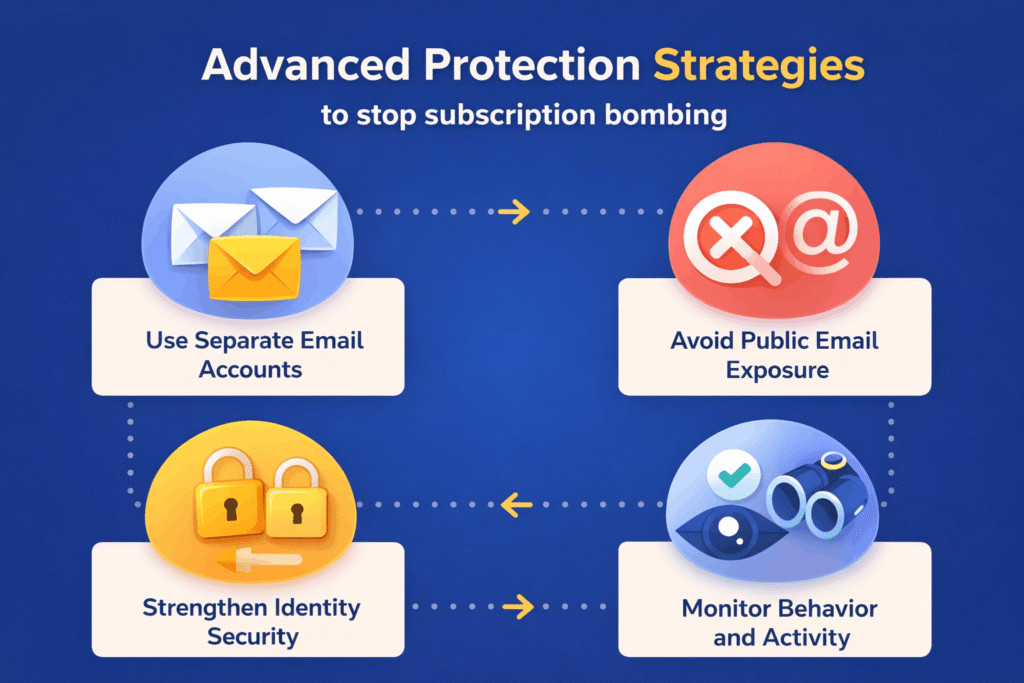
Advanced Protection Strategies
Stopping subscription bombing is not just about handling one incident. You need long term protection.
Use Separate Email Accounts
Keep one email for critical accounts and another for subscriptions. This reduces exposure.
Avoid Public Email Exposure
Do not publish your primary email on websites or forums.
Strengthen Identity Security
Implement strong identity controls using solutions like Modern Identity and Access Management IAM to reduce the risk of account takeover.
Monitor Behavior and Activity
Regularly review login history, device access, and unusual behavior patterns.
Final Thoughts
Subscription bombing is evolving into a sophisticated distraction based cyber attack. It takes advantage of trusted systems and user behavior rather than relying on traditional malware.
Understanding how to stop subscription bombing in Gmail and Outlook is essential in today’s threat landscape.
From my experience, the biggest mistake users make is focusing only on cleaning the inbox. The real priority should be identifying hidden threats and securing accounts.
With the right approach, you can not only stop the attack but also prevent serious data loss and security incidents in the future.
