

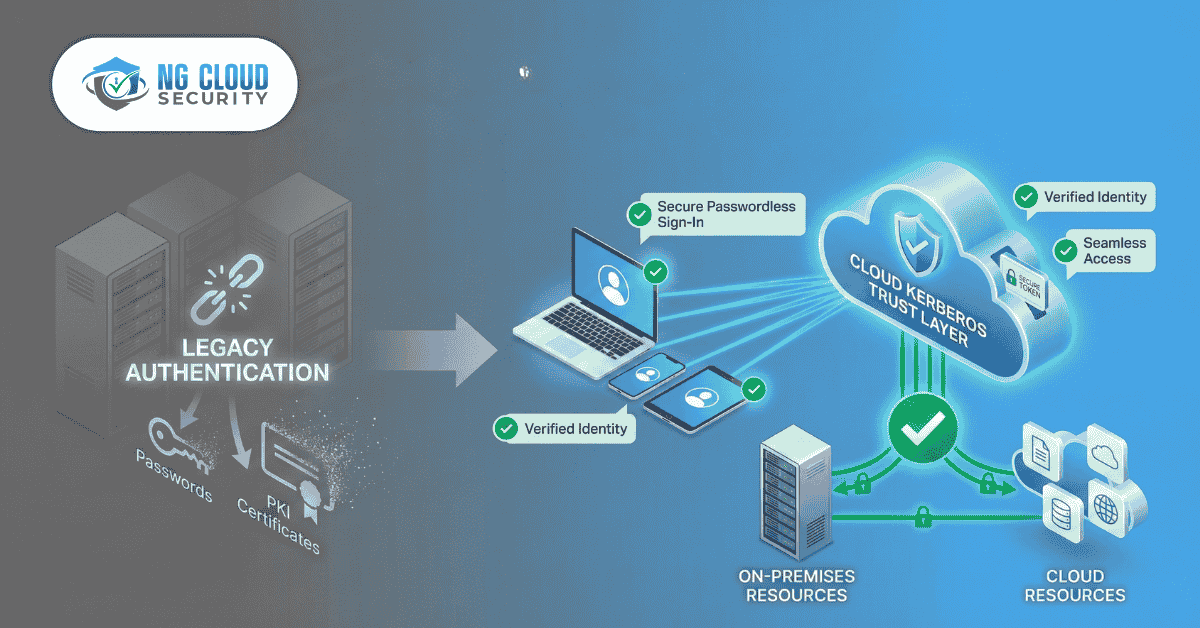
Ditch the PKI: How to Go Truly Password less in a Hybrid World with Cloud Kerberos Trus
Article Summary / Key Takeaways: This article explains how IT admins can use Windows Hello for Business with the Cloud Kerberos Trust model to achieve true passwordless sign-in for hybrid environments. This method eliminates the need for a complex and costly on-premises Public Key Infrastructure (PKI), allowing users to access both cloud and on-prem resources seamlessly using biometrics or a PIN. Key benefits include lower maintenance, stronger security, and a unified user experience.
What is Windows Hello for Business?
Windows Hello for Business (WHfB) is a strong authentication method built into Windows. It replaces passwords with a secure, two-factor credential. Instead of a password, users log in with a:
- Fingerprint
- Facial scan (biometrics)
- Device-specific PIN
These credentials are asymmetric (a public/private key pair) and are bound to the device's hardware (TPM), making them highly resistant to phishing and credential theft.
The Old Problem: Why Was Hybrid Passwordless So Hard?
The main challenge for IT admins was on-premises resources. When a user tried to access an on-prem file share or app using their Windows Hello PIN, the on-prem Active Directory (AD) Domain Controllers (DCs) couldn't validate that credential.
The traditional solution was Certificate Trust. This required deploying a full Public Key Infrastructure (PKI) to issue certificates to every user and DC. This was a massive administrative burden, involving:
- Building and managing Certificate Authority (CA) servers.
- Handling certificate templates, issuance, and renewal.
- Dealing with complex certificate revocation lists (CRLs).
For many organizations, the cost and complexity of a hybrid PKI was a major roadblock.
The New Solution: What is Cloud Kerberos Trust?
Cloud Kerberos Trust is a modern deployment model for Windows Hello for Business that does not require a PKI.
Instead of your on-prem AD trusting certificates you issue, you configure your on-prem AD to directly trust Azure Active Directory (Azure AD).
When a user logs in with Windows Hello, Azure AD issues a partial Kerberos Ticket-Granting-Ticket (TGT). Because your on-prem Domain Controller trusts Azure AD, it accepts this ticket and issues a standard on-prem TGT. This allows the user to seamlessly access on-prem Kerberos resources (like file shares and apps) without a password and without a certificate.
How Does Cloud Kerberos Trust Work? (Step-by-Step)
Here is a simplified view of the authentication flow:
- User Sign-In: A user logs into their hybrid-joined Windows device using their fingerprint or PIN.
- Azure AD Validation: Windows contacts Azure AD, which validates the strong, device-bound Windows Hello credential.
- Azure AD Issues Ticket: Azure AD issues a partial Kerberos TGT (also called a "Cloud TGT") back to the device.
- On-Prem Resource Access: The user tries to access an on-prem file share. Windows presents the Cloud TGT to the on-prem Domain Controller (DC).
- DC Grants Access: Because the DC is configured with Cloud Kerberos Trust, it trusts the ticket from Azure AD. It then issues a normal on-prem TGT and service ticket, granting the user access.
The result is true, passwordless Single Sign-On (SSO) to both cloud and on-prem resources.
What Are the Benefits for IT Admins?
- Drastically Lower Maintenance: You completely eliminate the cost, complexity, and fragility of managing an on-prem PKI for user authentication.
- Seamless Hybrid Access: It bridges the gap between cloud and on-prem. Users get one simple, fast login for everything, from Microsoft 365 to legacy apps.
- Stronger Security & Compliance: This is a major security upgrade. It moves you to phishing-resistant MFA, helps you meet compliance requirements (NIST, CMMC, etc.), and aligns perfectly with a Zero Trust security model.
How Can NG Cloud Security Help?
While Cloud Kerberos Trust is simpler than a PKI, it is not a "single switch." A successful deployment requires careful planning, prerequisite checking, and configuration of the trust between Azure AD and your on-prem AD.
At NG Cloud Security, our team of Microsoft-certified experts specializes in deploying modern security and identity solutions. We help IT teams like yours:
- Assess your current hybrid environment.
- Configure the Cloud Kerberos Trust safely and efficiently.
- Create policies in Intune or GPO for a smooth user rollout.
- Achieve your passwordless goals without disrupting your business.
Frequently Asked Questions (FAQ)
Q: Do I need any new hardware for Cloud Kerberos Trust?
A: No. Cloud Kerberos Trust is a configuration-based solution. Your existing Domain Controllers (Windows Server 2016 or newer) and hybrid-joined client devices (with TPM 2.0) are supported.
Q: Does this replace my PKI completely?
A: It replaces the need for a PKI for user and device authentication. If you use a PKI for other services, like Wi-Fi (RADIUS) or VPN authentication, you may still need it for those specific use cases.
Q: What is the main difference between Cloud Kerberos Trust and Key Trust?
A: Key Trust was another model that still required a PKI to issue certificates to your Domain Controllers. Cloud Kerberos Trust is the first model that removes the PKI requirement entirely by creating a trust object directly in AD.
Q: Is this secure?
A: Yes. This is a highly secure, Microsoft-recommended solution. The authentication is based on strong, hardware-bound cryptographic keys and aligns with modern Zero Trust principles.

Author
Devendra Singh
Hi, I'm Founder & Chief Security Architect at NG Cloud Security, a leading Managed Security Service Provider and Cloud Solution Partner. With over a decade of experience advising global organizations, he helps leaders navigate digital transformation while balancing security, compliance, and business goals. Working with clients across Asia, Europe, and the US, Devendra Singh delivers Zero Trust–aligned cloud and IT strategies, from risk assessments to multi-cloud implementation and optimization, driving stronger security, operational efficiency, and measurable business growth.